

Why Most Automobile Websites Don’t Get Calls And How to Fix It?
Author: Sazid Al Mahmud | Co Founder of Inovlance
Published January 8, 2026
Why is a website important for Automobile businesses?
Author: Sazid Al Mahmud | Co Founder of Inovlance.
Published January 8, 2026
50%-60% automobile businesses have their website set up online, but the problem is that they don’t work. The website can’t generate calls as you expected.
The problem is:
-
They look fine.
-
They have services listed.
-
They even have a phone number.
But the phone doesn’t ring. Even when you ask a customer if they came from your website, they don’t know your website’s existence.
And daily as a owner of an automobile business, you are thinking your investment in the website was all in vain. But let me tell you its not your fault nor your business. Your business is good and fine with a proper place. Although your website is missing some basics.
In this blog, you’ll know why your website isn’t working, and you can troubleshoot and fix it yourself.
Table of contents
- Your Pages are not giving any trust signals
- Your Phone Number Is Hard to Find
- The website looks bad or broken on Mobile
- Google Doesn’t Trust Your Website Yet
- Your Website Is Not Local-Focused
Want anyone to manage your website?
Running an automobile business is hard. I know what it’s like to go through every car and identify problems and fix the issues. Not just one or two days, yoy.
Key Takeaways

Lorem ipsum dolor sit amet, consectetur adipiscing elit. Ut elit tellus, luctus nec
Lorem ipsum dolor sit amet, consectetur adipiscing elit

1000+ emplesf

Lorem ipsum dolor sit amet, consectetur adipiscing elit. Ut elit tellus, luctus nec

Your Pages are not giving any trust signals
A potential customer into your website and see if you can fix his/her problem. If your webpages aren’t conveying the message that you can help them, they immediately leave and take the services from your competitors.
Think like a customer:
Your car broke down in the middle of the road, and you are stressed.
You search on Google
When you open your website, you are thinking only one thing:
“Can this person help me right now?”
What's the problem?
- Your pages are all about yourself, not if you can help them
- Service pages are confusing and are hidden
- No clear message like: 24/7 help, emergency auto repairs, Mobile mechanic near [ Current Area]
If your potential customer doesn’t understand within 10 seconds whether you can help him/her, they leave. As simple as that. Is it? – NO, it’s dangerous, as you are losing a lot of calls and revenue. Even missed an option to charge more in emergency automobile services.
Contact Us

Lorem ipsum dolor sit amet
Lorem ipsum dolor sit amet, consectetur adipiscing elit.
Read All Case Studys
Key Takeaways

Western
union
Lorem ipsum dolor sit amet, consectetur adipiscing elit. Ut elit tellus, luctus nec ullamcorper mattis, pulvinar dapibusLorem ipsum dolor sit amet, consectetur adipiscing elit. Ut elit tellus, luctus nec ullamcorper mattis, pulvinar dapibus leo.


Read All Case Studys
Key Takeaways

Western
union
Lorem ipsum dolor sit amet, consectetur adipiscing elit. Ut elit tellus, luctus nec ullamcorper mattis, pulvinar dapibusLorem ipsum dolor sit amet, consectetur adipiscing elit. Ut elit tellus, luctus nec ullamcorper mattis, pulvinar dapibus leo.
Read All Case Studys

Western
union
Lorem ipsum dolor sit amet, consectetur adipiscing elit. Ut elit tellus, luctus nec ullamcorper mattis, pulvinar dapibusLorem ipsum dolor sit amet, consectetur adipiscing elit. Ut elit tellus, luctus nec ullamcorper mattis, pulvinar dapibus leo.
Read All Case Studys
How to fix?
On the top part of your homepage, clearly say:
- What you do
- Who you help
- Where you help
Your Phone Number Is Hard to Find
A very common and usual mistake a website could have is hiding the phone number. How can you even expect someone’s calls if your phone number is hidden under a hood in your website, or it’s not visible?
Key Takeaways

Western
union
Lorem ipsum dolor sit amet, consectetur adipiscing elit. Ut elit tellus, luctus nec ullamcorper mattis, pulvinar dapibusLorem ipsum dolor sit amet, consectetur adipiscing elit. Ut elit tellus, luctus nec ullamcorper mattis, pulvinar dapibus leo.
Read All Case Studys
Key Takeaways

Western union
Lorem ipsum dolor sit amet, consectetur adipiscing elit. Ut elit tellus, luctus nec ullamcorper mattis, pulvinar dapibusLorem ipsum dolor sit amet, consectetur adipiscing elit. Ut elit tellus, luctus nec ullamcorper mattis, pulvinar dapibus leo.
Read All Case Studys
What usually goes wrong?
- Maybe your phone number is only in the footer
- No “Call Now” button
- Click doesn’t work on mobile
- Different numbers in different pages on the website
Your potential customers don’t search for your number; if the number isn’t visible or cannot be found easily, they just leave without any trace
Do you want more traffic?
Lorem ipsum dolor sit amet, consectetur adipiscing elit.
How to fix it?
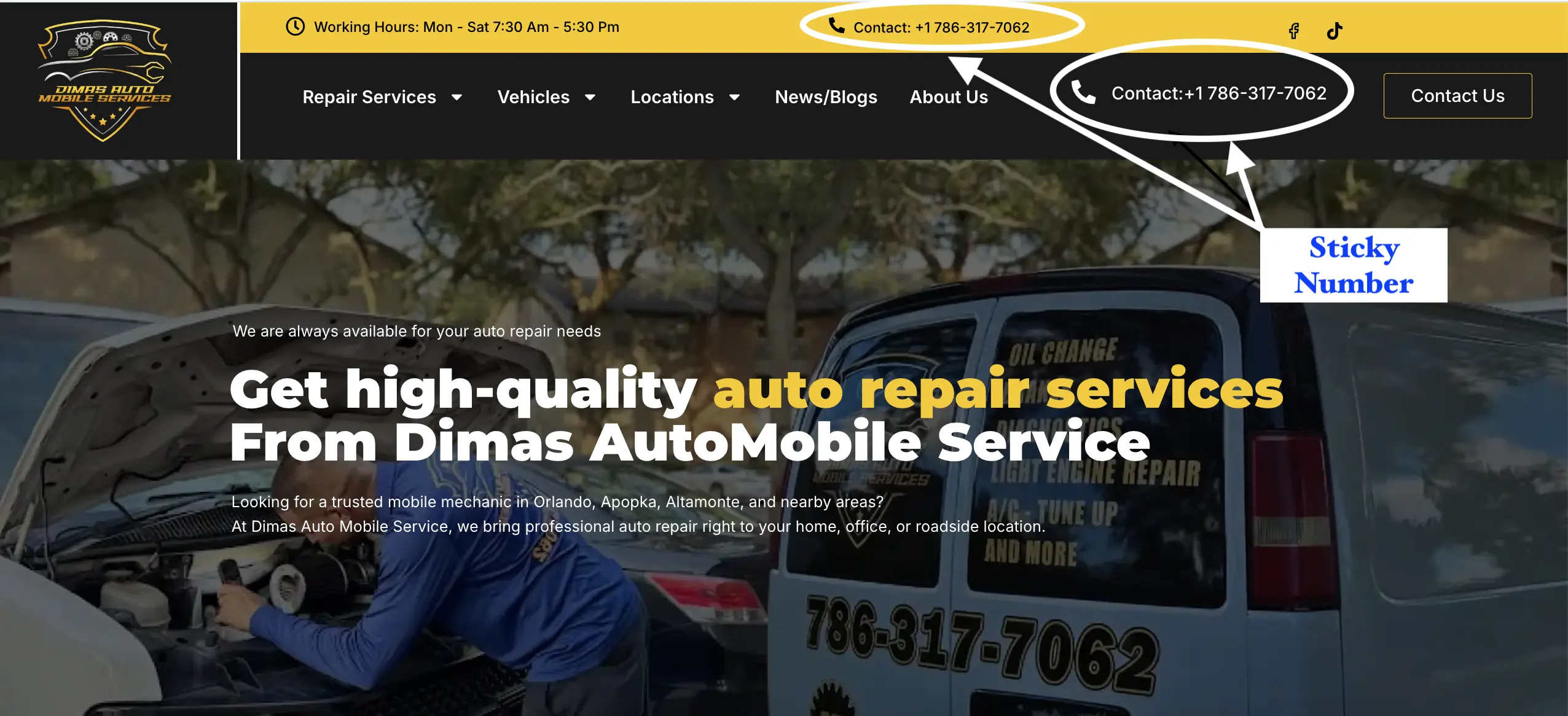
1. Show the phone number in bold in the website’s top navbar, even if it’s sticky.
Just like this:
2. Make the number clickable on both mobile devices and the desktop version.
3 steps to see if the number is already clickable:
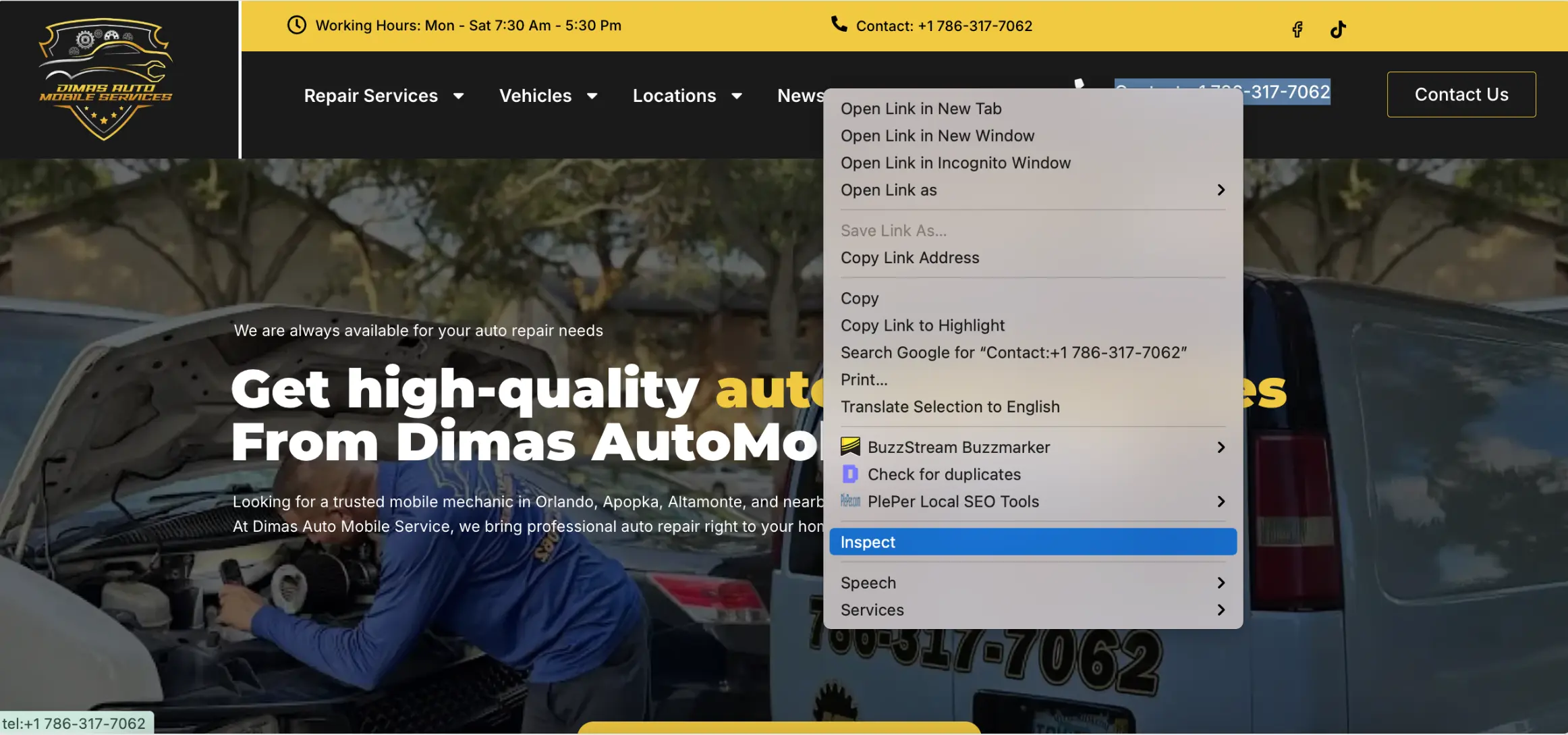
- Step 1: In the browser Right-click on the number and go to inspect
- Step 2: In the inspection section, the number code is in this form:
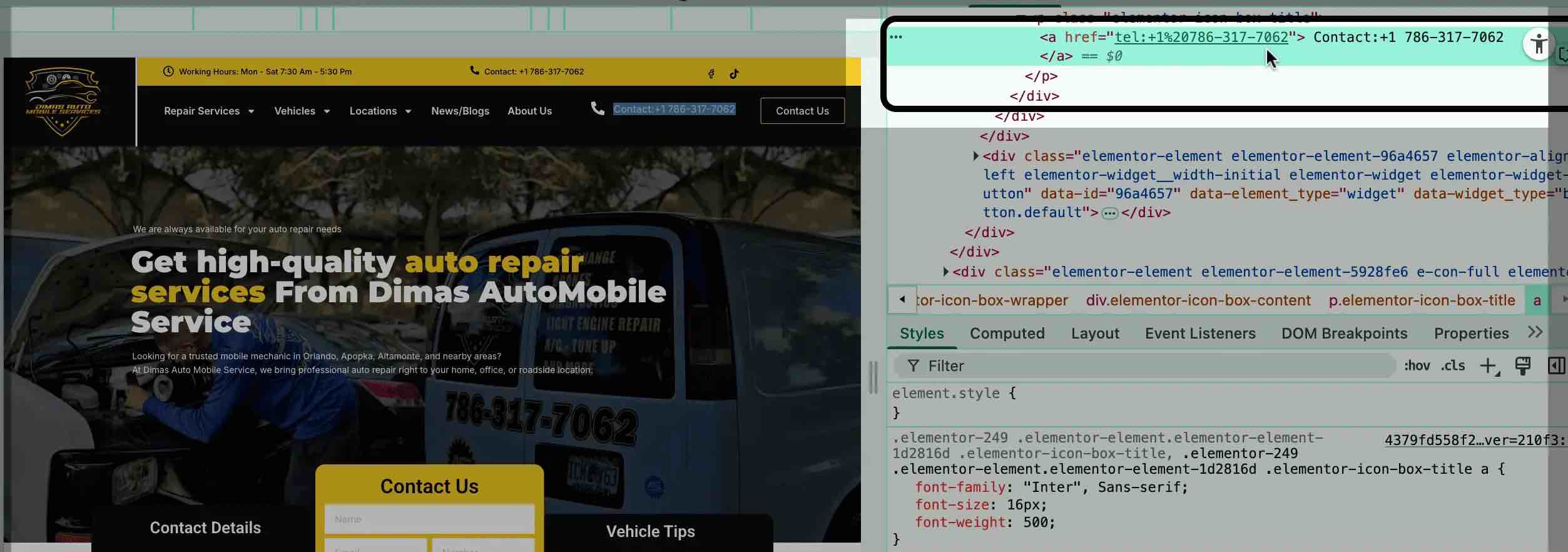
Step 3: If not, fix it with the example as shown in the backend of the website, then put the <a> code into the backend of the code, example 👇
<a href="tel:+your number"> mention your number‹/a›
3. Make sure it is clickable on mobile, which means if someone clicks on the number, it should dial without any delay.
Just like this 👇
4. Use one main number everywhere, across all over the website
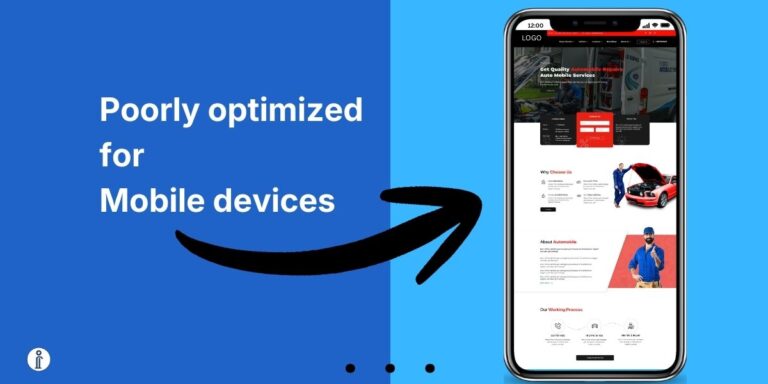
The website looks bad or broken on Mobile
70% Searches on Google worldwide are happening on mobile phones. So, most of your customers are seeing your website on a mobile phone, not on a desktop.
The frustrating fact is that when agencies build a website, they have a tendency only make the website look good on desktop devices instead of mobile.
If your website is old-fashioned and hasn’t updated in a long time, you need to do it today. Otherwise, you won’t get calls.
What's wrong?
- The website is perfect in laptop or a desktop, but not on phones
- Text on mobile phones is too small to read
- Buttons are hard to click and hard to find
- Page loads very slowly on mobile
When the website is loading slowly on mobile phones and isn’t accessible properly on mobile phones, customers leave immediately, and you miss the opportunity to get calls or earn revenue.
Does your website look like this? 👇
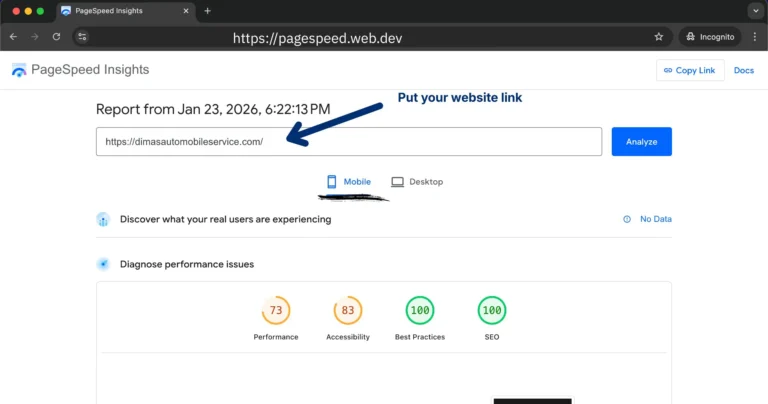
Troubleshot if your website is perfect on mobile:
Follow these techniques:
- Open your website on your phone with a mobile data plan 📶
- Ask yourself these questions:
“Can I call easily?”
“Can I read the website content easily without zooming?”
“Can I open images properly?”
“Can I open a page, and the content in the page loads faster, even if I scroll down to the bottom?”
- Use Google’s Mobile-Friendly Test tool to see if the score is good and green
Identify if your website looks bad on mobile devices. If the elements in the website don’t load properly, or the layouts crash when opening the website, or even if the design is outdated, contact the developer/ hire an agency that can do this for you. You can do it yourself, but don’t break anything. If you do, the cost will be a lot to afford to fix then.
Google Doesn’t Trust Your Website Yet
A website isn’t just for a showcase, it’s built for use 24/,7 even when no one is maintaining it, it should be able to generate calls and customers daily.
You can ask why google need to trust my website, right? – Thats a good question.
To give you context, let me ask you, when was the last time you went to an unknown place without the help of Google Maps? – Maybe you don’t even remember.
When we use the term “Surf the internet”, we usually mean to say “surf the google to do the research”.
Your customers are the same. They use Google to find the best auto repair services in their nearby areas when they need the service.
Google search has its own algorithm.
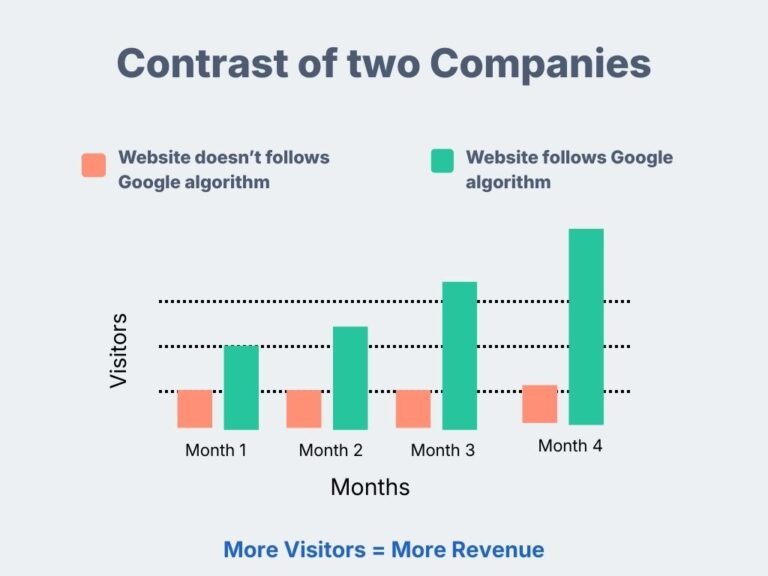
If your website doesn’t follow the algorithm of Google search, they don’t trust your website. And guess what? You don’t show up on important business searches on Google search nor in the maps. As Google Maps gets complemented by your website.
“No visitors = No calls, No Revenue.”
The Equation is:
More Visitors = More Calls and Revenue
What usually goes wrong?
- Your website is new
- No proper content
- Your service location isn’t mentioned clearly
- No connection with Google Business Profile
Fixes of trust issues in Google search:
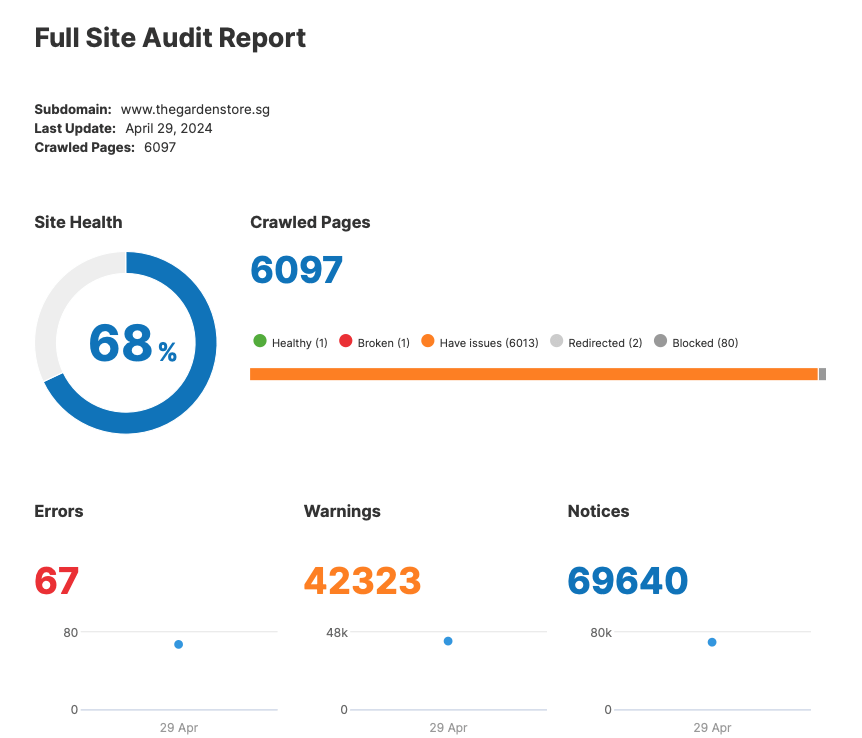
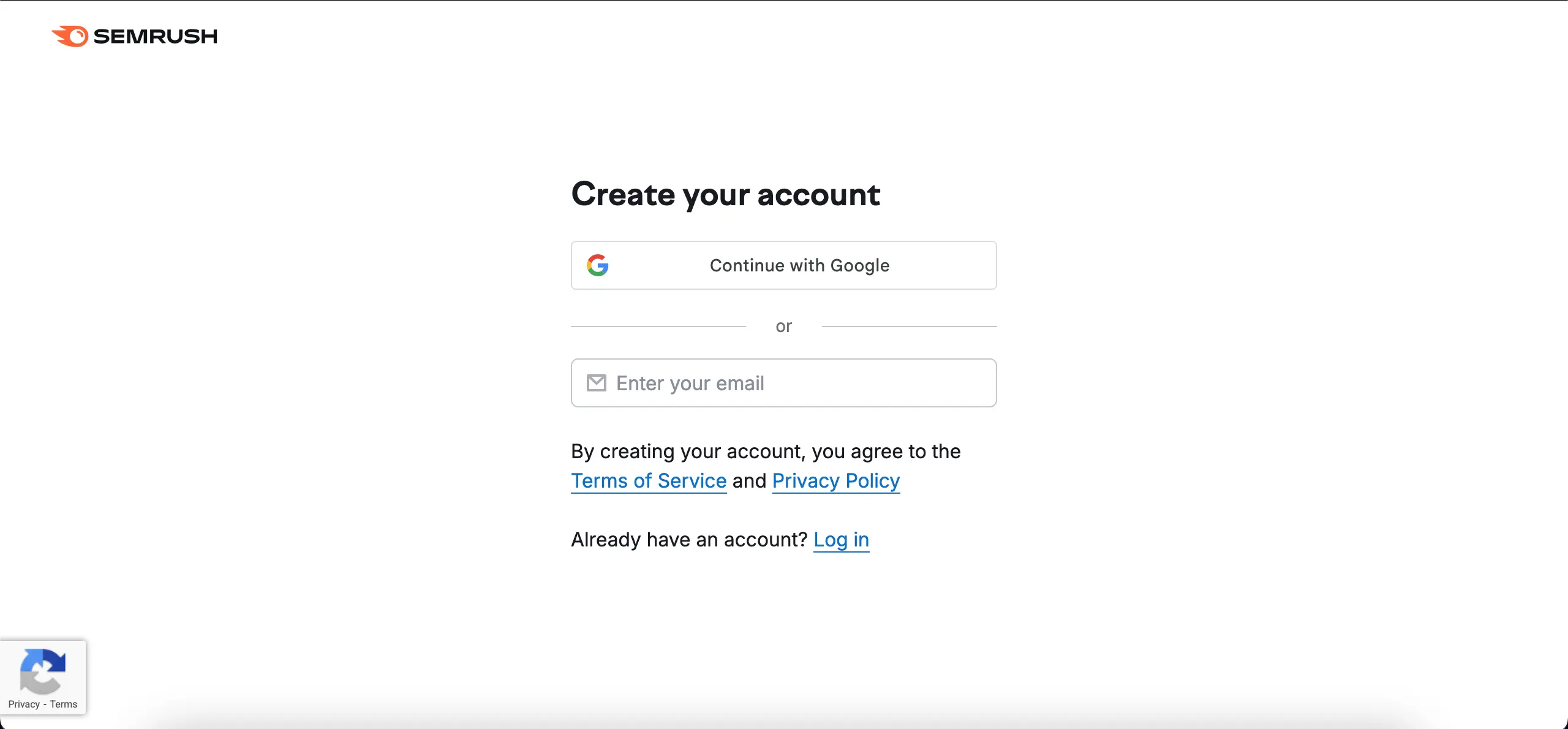
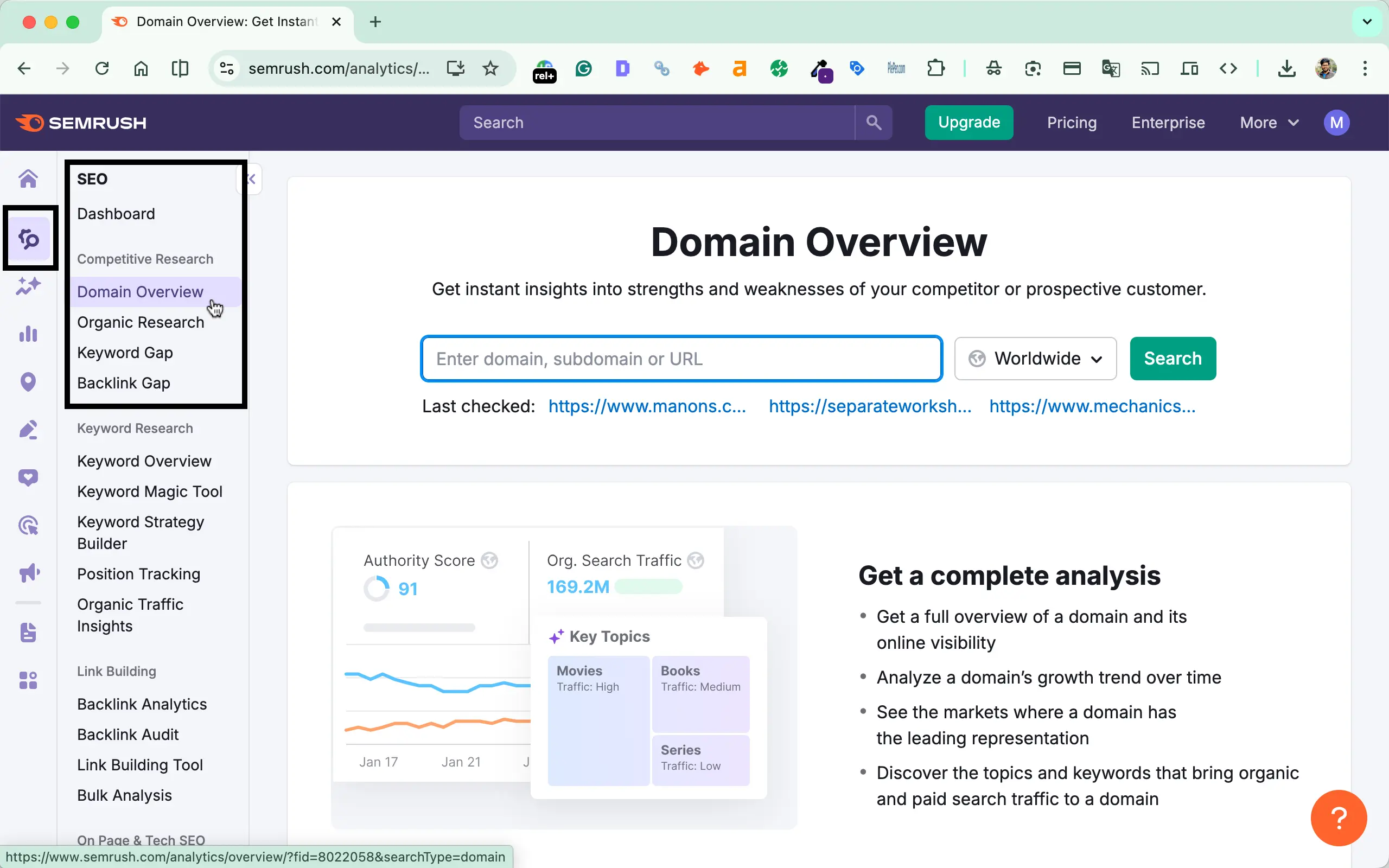
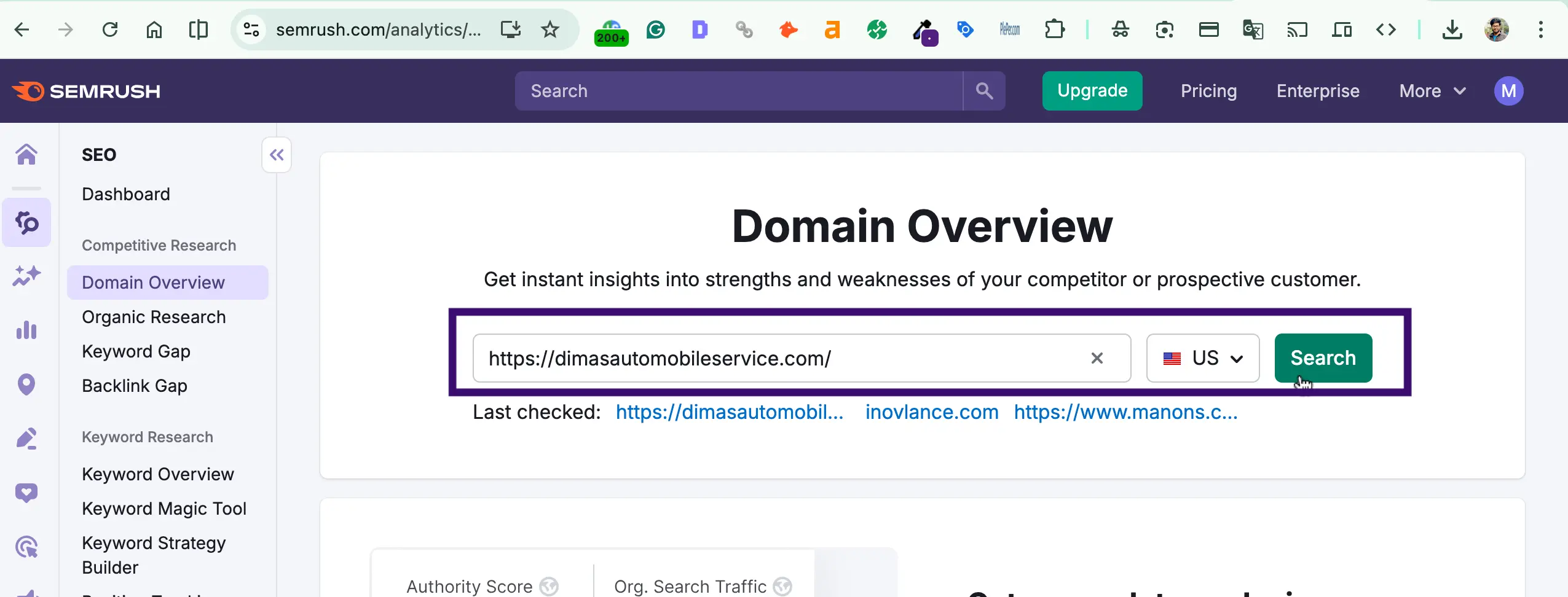
- Use tools like SemRush. Create an account > go to the Domain Overview tab > put your website domain name > Select the country (location your business is located) > Hit enter > See the organic keywords tab.
Step 1: Create an account on Semrush and login.
Step 2: Go to the Domain overview section on the left:
Step 3: Put your website link and select the location
Step 4: See the organic Keyword traffic
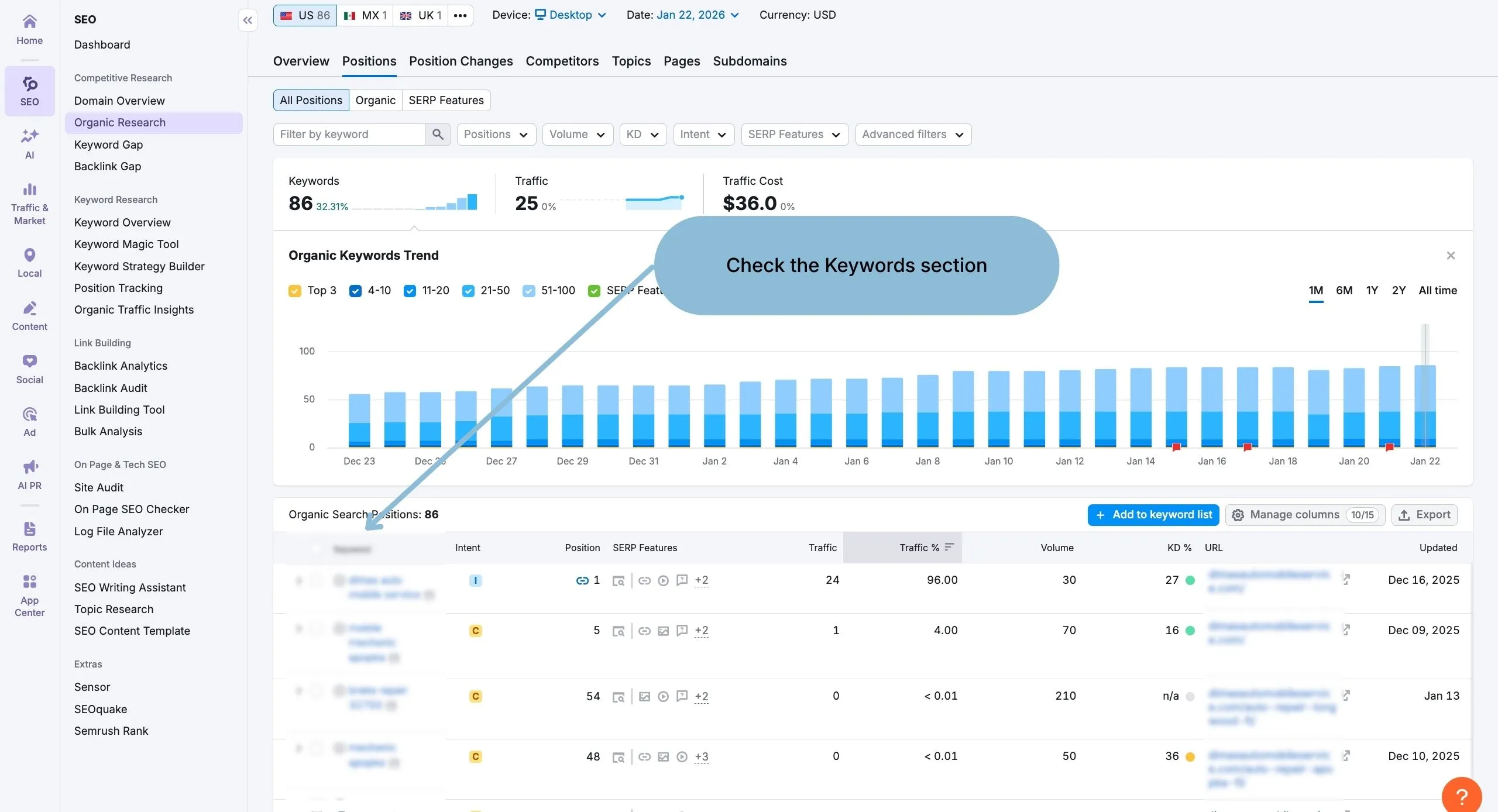
Step 5: Scroll down and see which keywords you are getting the most traffic from
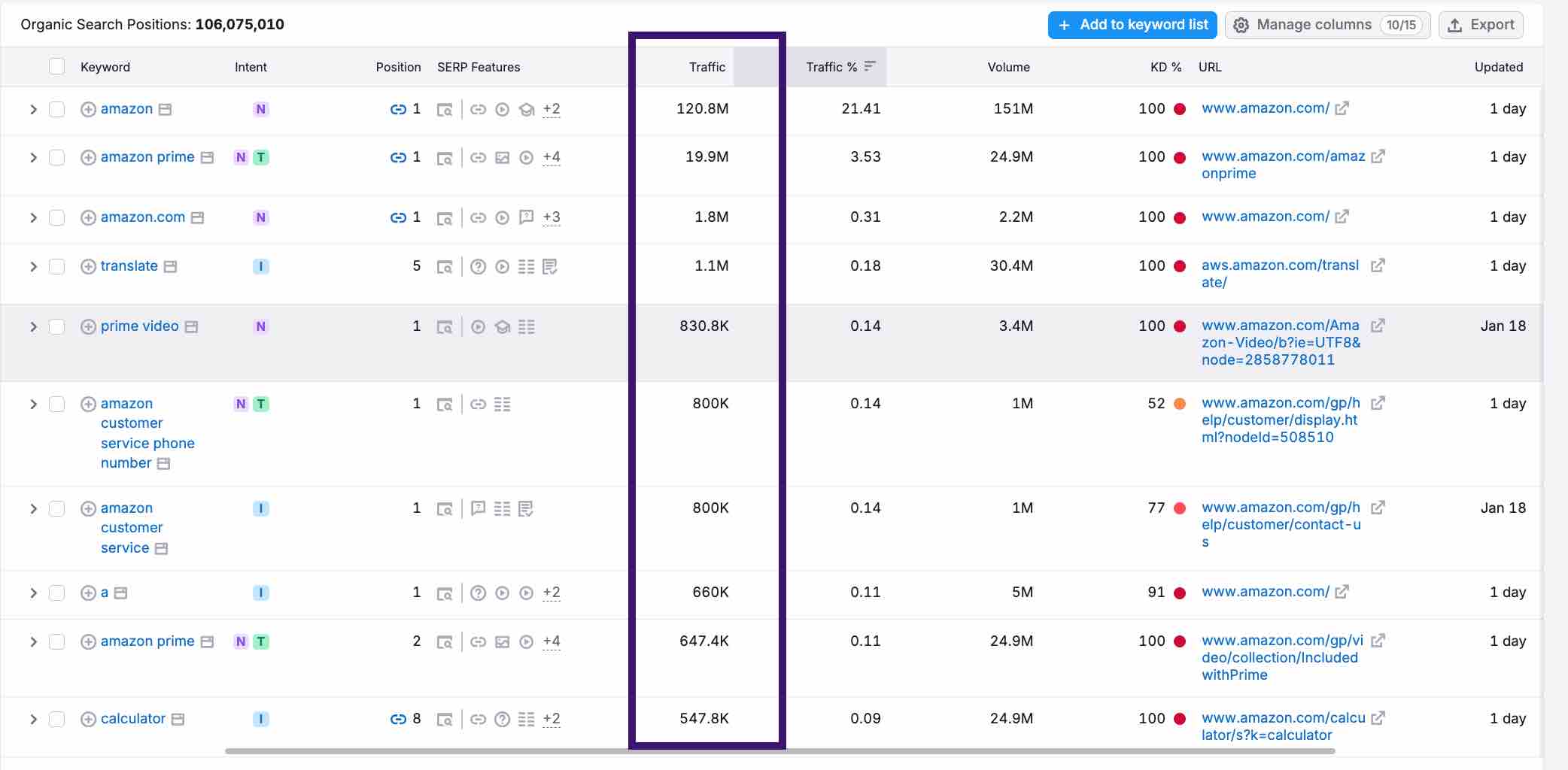
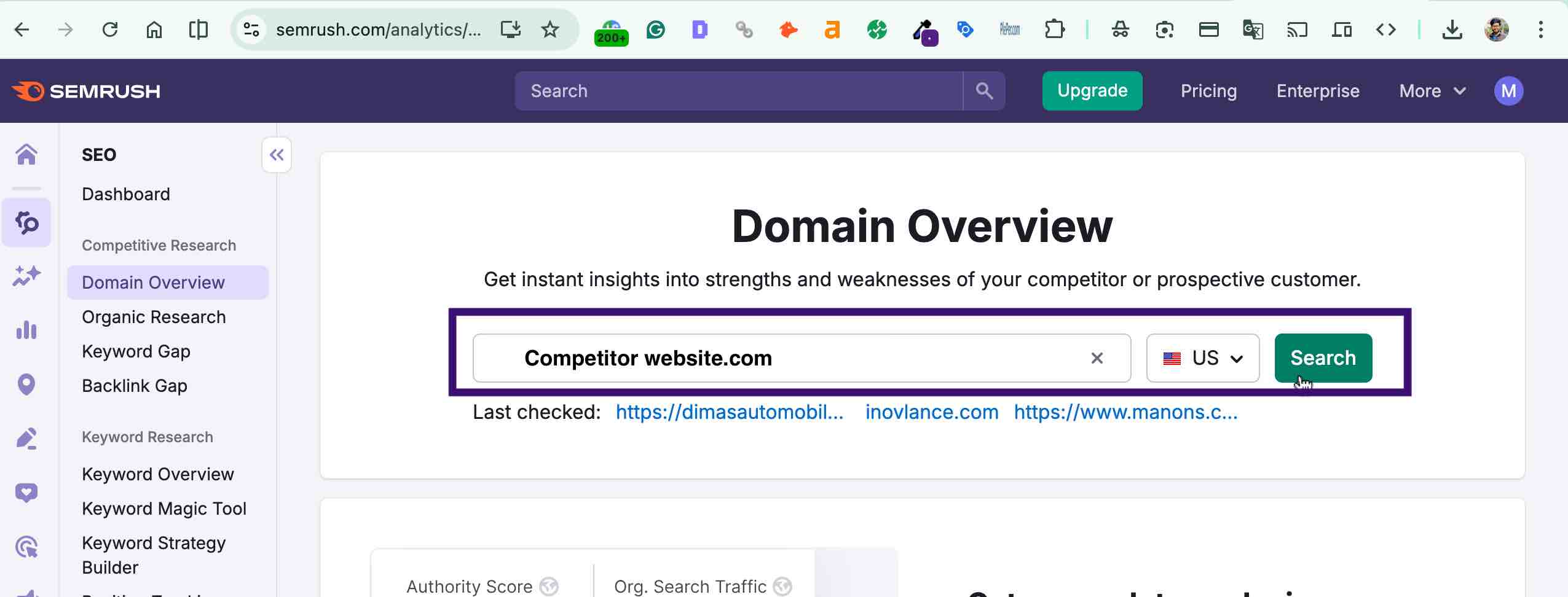
Notice how many keywords you are ranking for. If the number is not big enough, make more pages on your website.
- Use the same approach to research your competitors. Put your competitor’s business website in the Smersh domain overview tab and see their pages. If you do those services, make those pages on your website.
Put your competitors websites and see their organic keywords:
You don’t need to understand everything, just see if traffic exists or not. If there is an opportunity for visitors, make those pages accordingly.
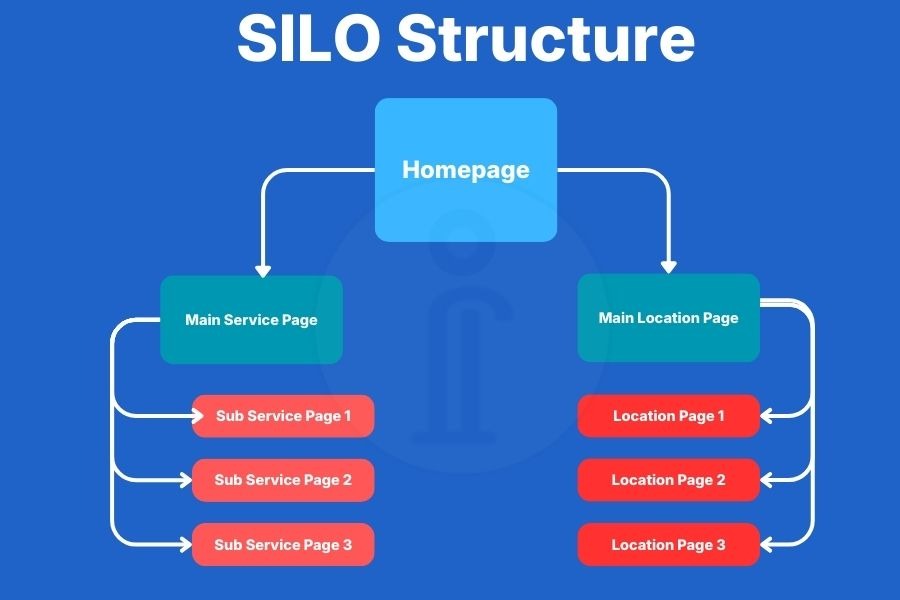
- Use SEO Friendly website structure. One of the best website structures that works for auto mobile business is SILO. Learn how a SILO structure is made
This is a Silo structure:

Your Website Is Not Local-Focused
If you are not getting any calls or even any interactions from your website. It seems to me that you have’t implemented or mentioned locations on your website anywhere. Thats a very crucial thing to miss.
You must mention your location throughout the website. If you serve multiple locations, you should implement best practices to inform users that you provide services in those areas as well.
If you provide auto repair services in only one location, use this framework:
- Make sure you mention your location everywhere
- Put the Google Maps embedded version in the footer section
- Write blog pages mentioning problems on that particular areas, major auto-related problems
- Share your website as much as possible in that area.
Conclusion
If your automobile website isn’t getting calls, it’s not your fault.
Most websites are:
- Poorly planned
- Poorly structured
- Built without thinking about real customers
All of this can be fixed.
Do you want more traffic?
Lorem ipsum dolor sit amet, consectetur adipiscing elit.